跳到主要內容

High Contrast

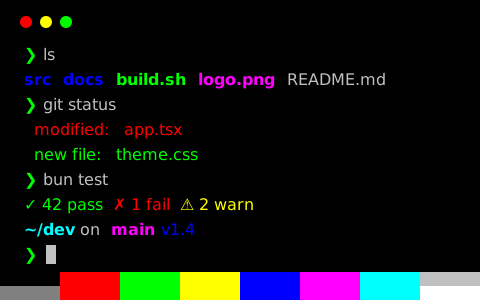
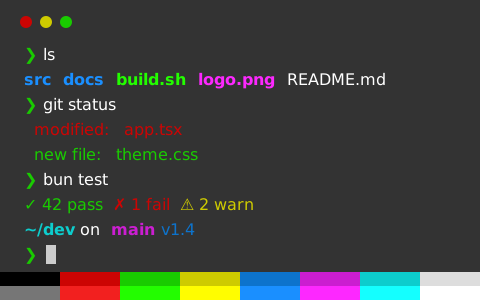
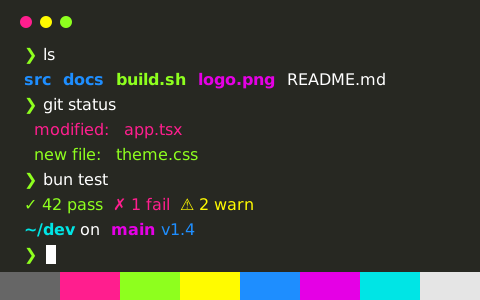
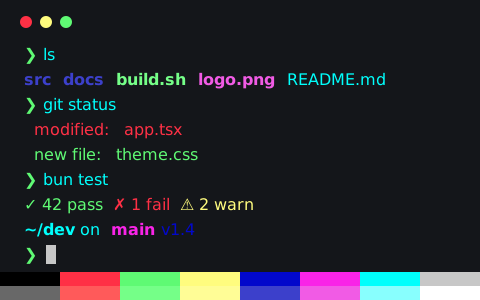
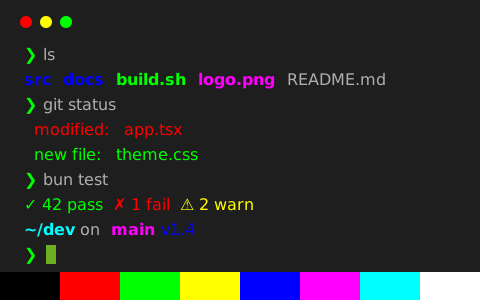
High Contrast 是一套深色終端機配色(鮮豔),背景色 #444444,文字色 #dddddd,對比度 7.2:1

取得設定檔
背景色
#444444
前景色
#dddddd
文字對比度
7.17:1AAA
強調色對比度
5.10:1最低 1.13
zsh — ls & git status
zsh — ls & git status — Konsole
~/dev/tintdex on main [!?] via ⬢ v1.4.3
❯ ls -la
drwxr-xr-x 12 ada staff 384 Oct 30 09:12 .
drwxr-xr-x 8 ada staff 256 Oct 29 18:40 ..
-rw-r--r-- 1 ada staff 1.2K Oct 30 09:10 .gitignore
drwxr-xr-x 5 ada staff 160 Oct 30 09:12 src
drwxr-xr-x 3 ada staff 96 Oct 28 11:02 public
-rwxr-xr-x 1 ada staff 2.4K Oct 30 08:57 build.sh
-rw-r--r-- 1 ada staff 4.1K Oct 30 09:01 package.json
lrwxr-xr-x 1 ada staff 18 Oct 27 14:33 node_modules -> ../cache/modules
-rw-r--r-- 1 ada staff 48K Oct 26 10:15 logo.png
-rw-r--r-- 1 ada staff 9.8M Oct 25 21:47 backup.tar.gz
~/dev/tintdex on main [!?] via ⬢ v1.4.3
❯ git status
On branch main
Your branch is ahead of 'origin/main' by 2 commits.
Changes to be committed:
new file: src/theme.css
modified: README.md
Changes not staged for commit:
modified: src/app.tsx
deleted: legacy/colors.js
Untracked files:
notes.md
~/dev/tintdex on main [!?] via ⬢ v1.4.3
❯

High Contrast 的設定檔

16 種格式,都從同一份色票產生

High Contrast

存到 ~/.config/ghostty/themes/High Contrast,再在 config 或 config.ghostty 裡寫 theme = High Contrast

更多 Ghostty 配色
原始檔
# Theme: High Contrast (Ghostty)
# Preview & customize online: https://tintdex.afengim.com/zh-tw/schemes/high-contrast?format=ghostty

palette = 0=#000000
palette = 1=#ff0000
palette = 2=#00ff00
palette = 3=#ffff00
palette = 4=#0000ff
palette = 5=#ff00ff
palette = 6=#00ffff
palette = 7=#ffffff
palette = 8=#000000
palette = 9=#ff0000
palette = 10=#00ff00
palette = 11=#ffff00
palette = 12=#0000ff
palette = 13=#ff00ff
palette = 14=#00ffff
palette = 15=#ffffff
background = #444444
foreground = #dddddd
cursor-color = #dddddd
cursor-text = #444444
selection-background = #676767
selection-foreground = #dddddd

High Contrast 色票

色票各槽位的色值及其相對背景的 WCAG 對比度
顏色槽位HEXRGBHSLOKLCH對比度
背景色background#444444rgb(68 68 68)hsl(0 0% 27%)oklch(38.7% 0.000 0)—
前景色foreground#ddddddrgb(221 221 221)hsl(0 0% 87%)oklch(89.8% 0.000 0)7.17 AAA
游標cursor#ddddddrgb(221 221 221)hsl(0 0% 87%)oklch(89.8% 0.000 0)7.17 AAA
游標文字cursorText#444444rgb(68 68 68)hsl(0 0% 27%)oklch(38.7% 0.000 0)1.00 低於 AA
選取範圍selection#676767rgb(103 103 103)hsl(0 0% 40%)oklch(51.4% 0.000 0)1.72 低於 AA
選取文字selectionText#ddddddrgb(221 221 221)hsl(0 0% 87%)oklch(89.8% 0.000 0)7.17 AAA
黑color0#000000rgb(0 0 0)hsl(0 0% 0%)oklch(0.0% 0.000 0)2.16 低於 AA
紅color1#ff0000rgb(255 0 0)hsl(0 100% 50%)oklch(62.8% 0.258 29.2)2.44 低於 AA
綠color2#00ff00rgb(0 255 0)hsl(120 100% 50%)oklch(86.6% 0.295 142.5)7.10 AAA
黃color3#ffff00rgb(255 255 0)hsl(60 100% 50%)oklch(96.8% 0.211 109.8)9.07 AAA
藍color4#0000ffrgb(0 0 255)hsl(240 100% 50%)oklch(45.2% 0.313 264.1)1.13 低於 AA
洋紅color5#ff00ffrgb(255 0 255)hsl(300 100% 50%)oklch(70.2% 0.322 328.4)3.11 AA 大字級
青color6#00ffffrgb(0 255 255)hsl(180 100% 50%)oklch(90.5% 0.155 194.8)7.77 AAA
白color7#ffffffrgb(255 255 255)hsl(0 0% 100%)oklch(100.0% 0.000 0)9.74 AAA
亮黑color8#000000rgb(0 0 0)hsl(0 0% 0%)oklch(0.0% 0.000 0)2.16 低於 AA
亮紅color9#ff0000rgb(255 0 0)hsl(0 100% 50%)oklch(62.8% 0.258 29.2)2.44 低於 AA
亮綠color10#00ff00rgb(0 255 0)hsl(120 100% 50%)oklch(86.6% 0.295 142.5)7.10 AAA
亮黃color11#ffff00rgb(255 255 0)hsl(60 100% 50%)oklch(96.8% 0.211 109.8)9.07 AAA
亮藍color12#0000ffrgb(0 0 255)hsl(240 100% 50%)oklch(45.2% 0.313 264.1)1.13 低於 AA
亮洋紅color13#ff00ffrgb(255 0 255)hsl(300 100% 50%)oklch(70.2% 0.322 328.4)3.11 AA 大字級
亮青color14#00ffffrgb(0 255 255)hsl(180 100% 50%)oklch(90.5% 0.155 194.8)7.77 AAA
亮白color15#ffffffrgb(255 255 255)hsl(0 0% 100%)oklch(100.0% 0.000 0)9.74 AAA

關於 High Contrast

High Contrast 採用中性色調的深色背景(#444444),預設前景色為 #dddddd。內文的 WCAG 對比度為 7.17:1(AAA),12 種 ANSI 彩色槽位平均對比度 5.10:1,最低 1.13:1。

色票整體色彩彩度較高,其中紅色為 #ff0000、綠色為 #00ff00、藍色為 #0000ff、洋紅為 #ff00ff。

支援一鍵匯出 Ghostty、iTerm2、Kitty、Alacritty、WezTerm、Windows Terminal、Warp、foot、Rio、XFCE4 Terminal、Xresources 終端機設定檔,同時提供 VS Code 與 Zed 整合式終端機、CSS 變數、Tailwind CSS 及 JSON 色票格式。

與 High Contrast 相似的配色
資料來源:Gogh (MIT OR Apache-2.0)