Clu
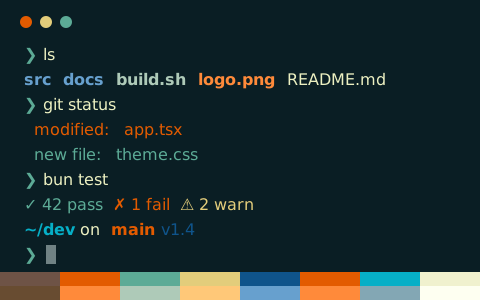
Clu is a cool, dark terminal color scheme with a #000d15 background and #fdd48d text (14.0:1 contrast)
- Background
- #000d15
- Foreground
- #fdd48d
- Text contrast
- 14.02:1AAA
- Accent contrast
- 10.34:1min 4.61
Clu configs
16 formats, all from one palette
Clu
Save to ~/.config/ghostty/themes/Clu, then set theme = Clu in config or config.ghostty
# Theme: Clu (Ghostty)
# Preview & customize online: https://tintdex.afengim.com/en/schemes/clu?format=ghostty

palette = 0=#21170c
palette = 1=#f60004
palette = 2=#00b5e4
palette = 3=#ffff0f
palette = 4=#e96700
palette = 5=#e96700
palette = 6=#ffffff
palette = 7=#00b5e4
palette = 8=#653333
palette = 9=#f60004
palette = 10=#ffffff
palette = 11=#ffffff
palette = 12=#00b5e4
palette = 13=#f60004
palette = 14=#f60004
palette = 15=#e96700
background = #000d15
foreground = #fdd48d
cursor-color = #00b5e4
cursor-text = #000d15
selection-background = #3c0000
selection-foreground = #fdd48d
Clu palette
About Clu
Clu is a dark terminal color scheme built on a cool-tinted #000d15 background with #fdd48d as the default foreground. Body text reaches a 14.02:1 WCAG contrast ratio (AAA), while the 12 ANSI accent colors average 10.34:1 (minimum 4.61:1).
Its palette is moderately saturated, anchored by #f60004 red, #00b5e4 green, #e96700 blue, and #e96700 magenta.
Ready-to-use configs can be exported for Ghostty, iTerm2, Kitty, Alacritty, WezTerm, Windows Terminal, Warp, foot, Rio, XFCE4 Terminal, and Xresources, along with VS Code and Zed integrated terminals, CSS variables, Tailwind CSS, and JSON.
Schemes similar to Clu
Source: iTerm2 Color Schemes (MIT)