本文へスキップ

Synthwave

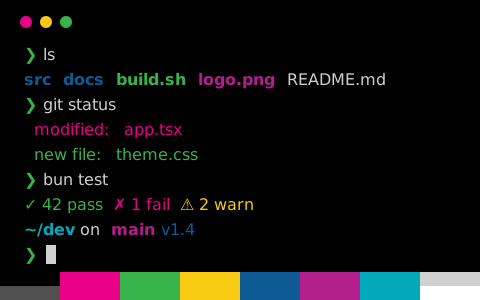
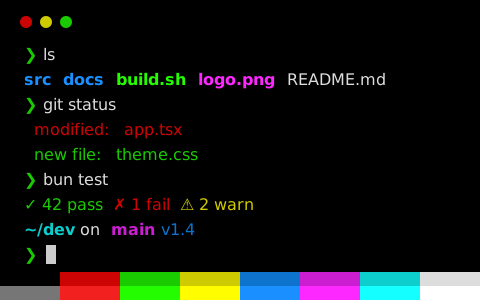
Synthwave はダーク系のターミナル配色(トゥルーブラック・ビビッド)。背景色 #000000、文字色 #dad9c7、コントラスト比 14.7:1

設定を取得
背景色
#000000
前景色
#dad9c7
文字のコントラスト
14.73:1AAA
アクセントのコントラスト
9.43:1最小 5.45
zsh — ls & git status
zsh — ls & git status — Konsole
~/dev/tintdex on main [!?] via ⬢ v1.4.3
❯ ls -la
drwxr-xr-x 12 ada staff 384 Oct 30 09:12 .
drwxr-xr-x 8 ada staff 256 Oct 29 18:40 ..
-rw-r--r-- 1 ada staff 1.2K Oct 30 09:10 .gitignore
drwxr-xr-x 5 ada staff 160 Oct 30 09:12 src
drwxr-xr-x 3 ada staff 96 Oct 28 11:02 public
-rwxr-xr-x 1 ada staff 2.4K Oct 30 08:57 build.sh
-rw-r--r-- 1 ada staff 4.1K Oct 30 09:01 package.json
lrwxr-xr-x 1 ada staff 18 Oct 27 14:33 node_modules -> ../cache/modules
-rw-r--r-- 1 ada staff 48K Oct 26 10:15 logo.png
-rw-r--r-- 1 ada staff 9.8M Oct 25 21:47 backup.tar.gz
~/dev/tintdex on main [!?] via ⬢ v1.4.3
❯ git status
On branch main
Your branch is ahead of 'origin/main' by 2 commits.
Changes to be committed:
new file: src/theme.css
modified: README.md
Changes not staged for commit:
modified: src/app.tsx
deleted: legacy/colors.js
Untracked files:
notes.md
~/dev/tintdex on main [!?] via ⬢ v1.4.3
❯

Synthwave の設定ファイル

16 種類の形式を、ひとつのパレットから生成

Synthwave

~/.config/ghostty/themes/Synthwave に保存し、config または config.ghostty に theme = Synthwave を書く

Ghostty の配色をもっと見る
元ファイル
# Theme: Synthwave (Ghostty)
# Preview & customize online: https://tintdex.afengim.com/ja/schemes/synthwave?format=ghostty

palette = 0=#000000
palette = 1=#f6188f
palette = 2=#1ebb2b
palette = 3=#fdf834
palette = 4=#2186ec
palette = 5=#f85a21
palette = 6=#12c3e2
palette = 7=#ffffff
palette = 8=#7f7094
palette = 9=#f841a0
palette = 10=#25c141
palette = 11=#fdf454
palette = 12=#2f9ded
palette = 13=#f97137
palette = 14=#19cde6
palette = 15=#ffffff
background = #000000
foreground = #dad9c7
cursor-color = #19cde6
cursor-text = #dad9c7
selection-background = #19cde6
selection-foreground = #000000

Synthwave のパレット

パレット各スロットの色値と背景に対する WCAG コントラスト比
カラースロットHEXRGBHSLOKLCHコントラスト
背景色background#000000rgb(0 0 0)hsl(0 0% 0%)oklch(0.0% 0.000 0)—
前景色foreground#dad9c7rgb(218 217 199)hsl(57 20% 82%)oklch(88.1% 0.024 104.3)14.73 AAA
カーソルcursor#19cde6rgb(25 205 230)hsl(187 80% 50%)oklch(77.9% 0.132 210.6)10.92 AAA
カーソルの文字cursorText#dad9c7rgb(218 217 199)hsl(57 20% 82%)oklch(88.1% 0.024 104.3)14.73 AAA
選択範囲selection#19cde6rgb(25 205 230)hsl(187 80% 50%)oklch(77.9% 0.132 210.6)10.92 AAA
選択範囲の文字selectionText#000000rgb(0 0 0)hsl(0 0% 0%)oklch(0.0% 0.000 0)1.00 AA 未満
黒color0#000000rgb(0 0 0)hsl(0 0% 0%)oklch(0.0% 0.000 0)1.00 AA 未満
赤color1#f6188frgb(246 24 143)hsl(328 93% 53%)oklch(63.9% 0.253 356.7)5.45 AA
緑color2#1ebb2brgb(30 187 43)hsl(125 72% 43%)oklch(69.0% 0.218 143.5)8.20 AAA
黄color3#fdf834rgb(253 248 52)hsl(59 98% 60%)oklch(95.3% 0.194 108.0)18.65 AAA
青color4#2186ecrgb(33 134 236)hsl(210 84% 53%)oklch(61.8% 0.177 253.4)5.69 AA
マゼンタcolor5#f85a21rgb(248 90 33)hsl(16 94% 55%)oklch(67.1% 0.204 38.0)6.48 AA
シアンcolor6#12c3e2rgb(18 195 226)hsl(189 85% 48%)oklch(75.3% 0.131 214.8)9.93 AAA
白color7#ffffffrgb(255 255 255)hsl(0 0% 100%)oklch(100.0% 0.000 0)21.00 AAA
明るい黒color8#7f7094rgb(127 112 148)hsl(265 14% 51%)oklch(57.2% 0.057 303.7)4.65 AA
明るい赤color9#f841a0rgb(248 65 160)hsl(329 93% 61%)oklch(67.1% 0.231 353.7)6.26 AA
明るい緑color10#25c141rgb(37 193 65)hsl(131 68% 45%)oklch(70.9% 0.209 145.2)8.78 AAA
明るい黄color11#fdf454rgb(253 244 84)hsl(57 98% 66%)oklch(94.7% 0.174 106.1)18.24 AAA
明るい青color12#2f9dedrgb(47 157 237)hsl(205 84% 56%)oklch(67.3% 0.152 245.5)7.17 AAA
明るいマゼンタcolor13#f97137rgb(249 113 55)hsl(18 94% 60%)oklch(70.4% 0.181 41.7)7.45 AAA
明るいシアンcolor14#19cde6rgb(25 205 230)hsl(187 80% 50%)oklch(77.9% 0.132 210.6)10.92 AAA
明るい白color15#ffffffrgb(255 255 255)hsl(0 0% 100%)oklch(100.0% 0.000 0)21.00 AAA

Synthwave について

Synthwave はニュートラルのダーク背景(#000000)を採用し、標準の前景色に #dad9c7 を使ったターミナル配色です。本文の WCAG コントラスト比は 14.73:1(AAA)、12 色の ANSI カラーは平均 9.43:1、最小 5.45:1 です。

パレット全体は彩度が高めで、赤 #f6188f、緑 #1ebb2b、青 #2186ec、マゼンタ #f85a21 を基調としています。Synthwave テーマファミリーに属する配色です。

Ghostty、iTerm2、Kitty、Alacritty、WezTerm、Windows Terminal、Warp、foot、Rio、XFCE4 Terminal、Xresources 向けの設定ファイルを書き出せるほか、VS Code・Zed の統合ターミナル、CSS 変数、Tailwind CSS、JSON 形式にも対応しています。

Synthwave に似た配色
データ出典:iTerm2 Color Schemes (MIT)