Skip to content

Newton Contrast

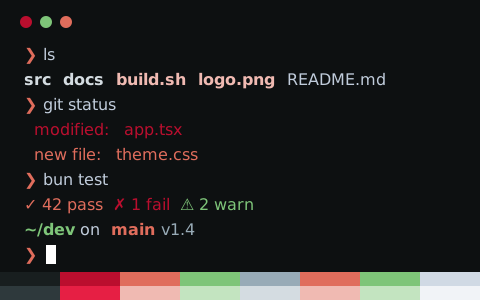
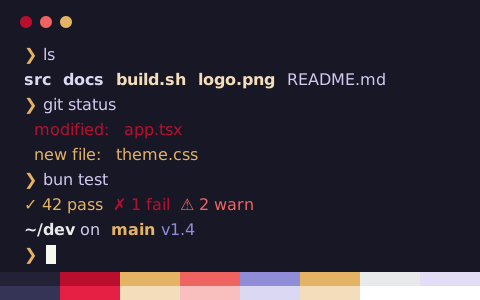
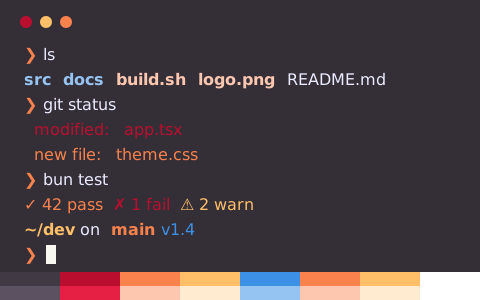
Newton Contrast is a high contrast, dark terminal color scheme with a #121014 background and #eaebff text (16.1:1 contrast)

Get config
Background
#121014
Foreground
#eaebff
Text contrast
16.06:1AAA
Accent contrast
9.93:1min 2.87
zsh — ls & git status
zsh — ls & git status — Konsole
~/dev/tintdex on main [!?] via ⬢ v1.4.3
❯ ls -la
drwxr-xr-x 12 ada staff 384 Oct 30 09:12 .
drwxr-xr-x 8 ada staff 256 Oct 29 18:40 ..
-rw-r--r-- 1 ada staff 1.2K Oct 30 09:10 .gitignore
drwxr-xr-x 5 ada staff 160 Oct 30 09:12 src
drwxr-xr-x 3 ada staff 96 Oct 28 11:02 public
-rwxr-xr-x 1 ada staff 2.4K Oct 30 08:57 build.sh
-rw-r--r-- 1 ada staff 4.1K Oct 30 09:01 package.json
lrwxr-xr-x 1 ada staff 18 Oct 27 14:33 node_modules -> ../cache/modules
-rw-r--r-- 1 ada staff 48K Oct 26 10:15 logo.png
-rw-r--r-- 1 ada staff 9.8M Oct 25 21:47 backup.tar.gz
~/dev/tintdex on main [!?] via ⬢ v1.4.3
❯ git status
On branch main
Your branch is ahead of 'origin/main' by 2 commits.
Changes to be committed:
new file: src/theme.css
modified: README.md
Changes not staged for commit:
modified: src/app.tsx
deleted: legacy/colors.js
Untracked files:
notes.md
~/dev/tintdex on main [!?] via ⬢ v1.4.3
❯

Newton Contrast configs

16 formats, all from one palette

Newton Contrast

Save to ~/.config/ghostty/themes/Newton Contrast, then set theme = Newton Contrast in config or config.ghostty

More Ghostty themes
Raw file
# Theme: Newton Contrast (Ghostty)
# Preview & customize online: https://tintdex.afengim.com/en/schemes/newton-contrast?format=ghostty

palette = 0=#1f1b22
palette = 1=#ba0e2e
palette = 2=#fa824c
palette = 3=#ffbf69
palette = 4=#3c91e6
palette = 5=#fa824c
palette = 6=#ffbf69
palette = 7=#ffffff
palette = 8=#38323e
palette = 9=#e61f44
palette = 10=#fdc7af
palette = 11=#ffebcf
palette = 12=#96c4f2
palette = 13=#fdc7af
palette = 14=#ffebcf
palette = 15=#ffffff
background = #121014
foreground = #eaebff
cursor-color = #f8f8f0
cursor-text = #eaebff
selection-background = #ff5d38
selection-foreground = #ffffff

Newton Contrast palette

Palette color values and WCAG contrast ratios against the background
ColorSlotHEXRGBHSLOKLCHContrast
Backgroundbackground#121014rgb(18 16 20)hsl(270 11% 7%)oklch(17.7% 0.009 307.9)—
Foregroundforeground#eaebffrgb(234 235 255)hsl(237 100% 96%)oklch(94.5% 0.027 283.6)16.06 AAA
Cursorcursor#f8f8f0rgb(248 248 240)hsl(60 36% 96%)oklch(97.7% 0.011 106.6)17.73 AAA
Cursor textcursorText#eaebffrgb(234 235 255)hsl(237 100% 96%)oklch(94.5% 0.027 283.6)16.06 AAA
Selectionselection#ff5d38rgb(255 93 56)hsl(11 100% 61%)oklch(68.8% 0.204 34.2)6.19 AA
Selection textselectionText#ffffffrgb(255 255 255)hsl(0 0% 100%)oklch(100.0% 0.000 0)18.92 AAA
Blackcolor0#1f1b22rgb(31 27 34)hsl(274 11% 12%)oklch(23.0% 0.015 310.7)1.12 Fail
Redcolor1#ba0e2ergb(186 14 46)hsl(349 86% 39%)oklch(50.3% 0.196 21.1)2.87 Fail
Greencolor2#fa824crgb(250 130 76)hsl(19 95% 64%)oklch(73.2% 0.162 43.6)7.53 AAA
Yellowcolor3#ffbf69rgb(255 191 105)hsl(34 100% 71%)oklch(84.6% 0.127 72.8)11.63 AAA
Bluecolor4#3c91e6rgb(60 145 230)hsl(210 77% 57%)oklch(64.6% 0.151 251.4)5.75 AA
Magentacolor5#fa824crgb(250 130 76)hsl(19 95% 64%)oklch(73.2% 0.162 43.6)7.53 AAA
Cyancolor6#ffbf69rgb(255 191 105)hsl(34 100% 71%)oklch(84.6% 0.127 72.8)11.63 AAA
Whitecolor7#ffffffrgb(255 255 255)hsl(0 0% 100%)oklch(100.0% 0.000 0)18.92 AAA
Bright Blackcolor8#38323ergb(56 50 62)hsl(270 11% 22%)oklch(32.8% 0.022 307.7)1.53 Fail
Bright Redcolor9#e61f44rgb(230 31 68)hsl(349 80% 51%)oklch(59.5% 0.225 19.4)4.18 AA Large
Bright Greencolor10#fdc7afrgb(253 199 175)hsl(18 95% 84%)oklch(87.1% 0.070 45.2)12.58 AAA
Bright Yellowcolor11#ffebcfrgb(255 235 207)hsl(35 100% 91%)oklch(94.9% 0.043 76.4)16.25 AAA
Bright Bluecolor12#96c4f2rgb(150 196 242)hsl(210 78% 77%)oklch(80.4% 0.082 248.9)10.34 AAA
Bright Magentacolor13#fdc7afrgb(253 199 175)hsl(18 95% 84%)oklch(87.1% 0.070 45.2)12.58 AAA
Bright Cyancolor14#ffebcfrgb(255 235 207)hsl(35 100% 91%)oklch(94.9% 0.043 76.4)16.25 AAA
Bright Whitecolor15#ffffffrgb(255 255 255)hsl(0 0% 100%)oklch(100.0% 0.000 0)18.92 AAA

About Newton Contrast

Newton Contrast is a dark terminal color scheme built on a neutral #121014 background with #eaebff as the default foreground. Body text reaches a 16.06:1 WCAG contrast ratio (AAA), while the 12 ANSI accent colors average 9.93:1 (minimum 2.87:1).

Its palette is moderately saturated, anchored by #ba0e2e red, #fa824c green, #3c91e6 blue, and #fa824c magenta.

Ready-to-use configs can be exported for Ghostty, iTerm2, Kitty, Alacritty, WezTerm, Windows Terminal, Warp, foot, Rio, XFCE4 Terminal, and Xresources, along with VS Code and Zed integrated terminals, CSS variables, Tailwind CSS, and JSON.

Schemes similar to Newton Contrast
Source: Rainglow (MIT)