- 背景色
- #1b1d1e
- 前景色
- #e3e3e3
- 文字对比度
- 13.18:1AAA
- 强调色对比度
- 3.82:1最低 2.10
zsh — ls & git status
zsh — ls & git status
zsh — ls & git status
zsh — ls & git status
zsh — ls & git status — Konsole
Spiderman 的配置文件
16 种格式,都从同一份色板生成
Spiderman
存到 ~/.config/ghostty/themes/Spiderman,再在 config 或 config.ghostty 里写 theme = Spiderman
# Theme: Spiderman (Ghostty)
# Preview & customize online: https://tintdex.afengim.com/schemes/spiderman?format=ghostty

palette = 0=#1b1d1e
palette = 1=#e60813
palette = 2=#e22928
palette = 3=#e24756
palette = 4=#2c3fff
palette = 5=#2435db
palette = 6=#3256ff
palette = 7=#fffef6
palette = 8=#505354
palette = 9=#ff0325
palette = 10=#ff3338
palette = 11=#fe3a35
palette = 12=#1d50ff
palette = 13=#747cff
palette = 14=#6184ff
palette = 15=#fffff9
background = #1b1d1e
foreground = #e3e3e3
cursor-color = #2c3fff
cursor-text = #000000
selection-background = #070e50
selection-foreground = #f0272d
Spiderman 色板
关于 Spiderman
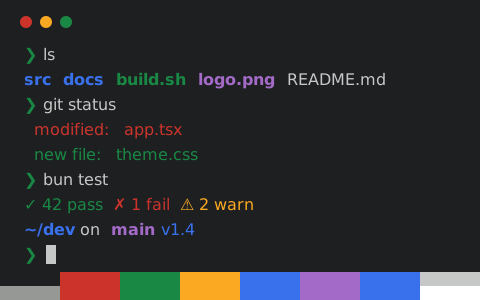
Spiderman 采用中性色调的深色背景(#1b1d1e),默认前景色为 #e3e3e3。正文的 WCAG 对比度为 13.18:1(AAA),12 种 ANSI 彩色槽位平均对比度 3.82:1,最低 2.10:1。
色板整体色彩饱和度较高,其中红色为 #e60813、绿色为 #e22928、蓝色为 #2c3fff、品红为 #2435db。
支持一键导出 Ghostty、iTerm2、Kitty、Alacritty、WezTerm、Windows Terminal、Warp、foot、Rio、XFCE4 Terminal、Xresources 终端配置文件,同时提供 VS Code 与 Zed 集成终端、CSS 变量、Tailwind CSS 及 JSON 色板格式。
与 Spiderman 相似的配色
数据来源:iTerm2 Color Schemes (MIT)